Task Bar of Ragnalis First Look
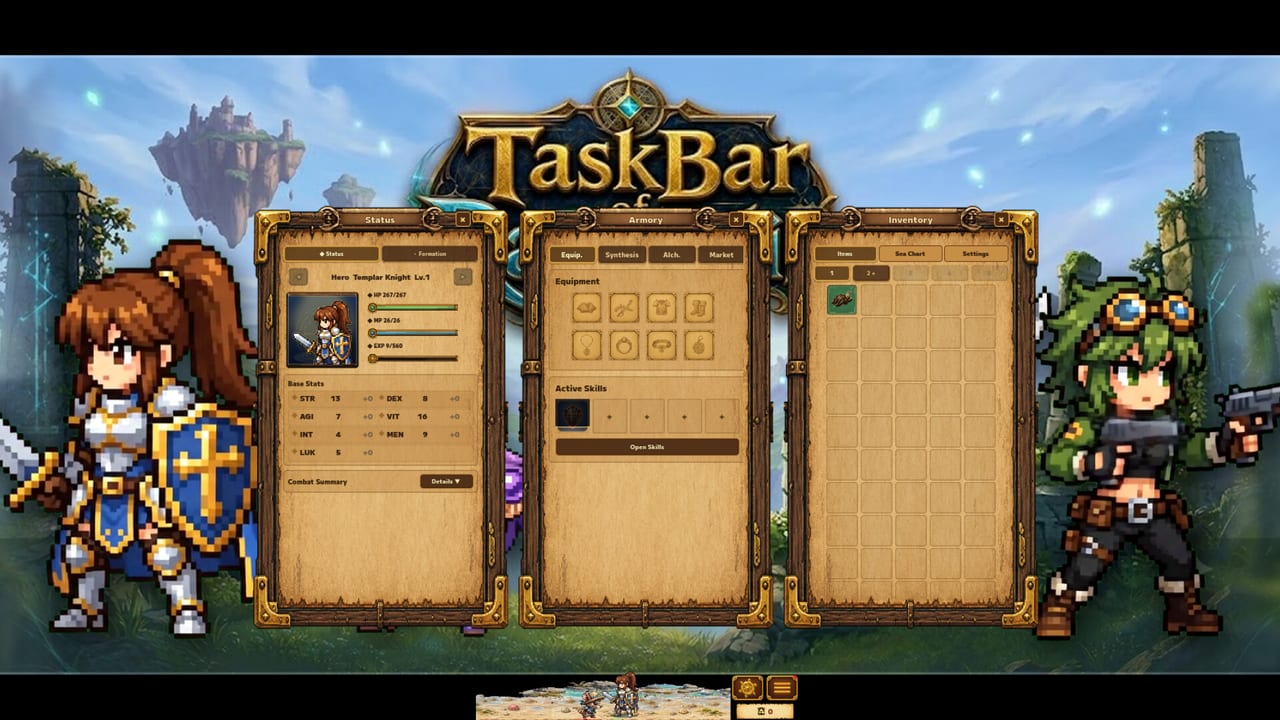
What the desktop battlefield looks like when you leave heroes fighting.
Why a first-look guide still matters after launch
Task Bar of Ragnalis marketed a clear fantasy: your Windows taskbar becomes a battlefield while heroes auto-fight, loot, and grow. Launch-day players and creators immediately compared that fantasy to another Steam idle title, Task Bar Hero. This page separates presentation from systems so you know what you are watching in footage and what you should practice in-game.
Use this together with How to Play. The how-to page is the checklist; this page is the visual and pacing breakdown.
What the trailer fantasy promises
Official store copy highlights:
- Fully automated hack-and-slash combat
- Chest loot that feeds a collect-and-stack loop
- A three-hero party with distinct classes, including Pirate as a featured fantasy class
- Equipment that can roll different random skills even when item names match
- A compact desktop footprint that stays out of the way until you check in
Those pillars are real design goals. Launch reviews also claim execution problems—unreadable UI, soft early damage, progression bugs—so treat footage as a tour, not a guarantee that every account will snowball on day one. Balance expectations with the Honest Review.
Reading gameplay videos the smart way
When you watch a first-look video, pause on four things:
- Window chrome — How large is the battle view? Can you still see inventory text?
- Chest cadence — Are rewards appearing regularly, or is the run visually busy but loot-poor?
- Equip friction — Does the creator constantly open menus to swap class-locked gear?
- Party moments — When does a second or third hero actually change clear speed?
Those checkpoints map to wiki deep dives: Taskbar Setup, Items, Gunner Guide, and Party Builds.
Desktop spectacle versus management game
The spectacle is the tiny battlefield. The real game is management. If you only watch kill animations, you will miss why veterans obsess over nine-copy stacks and skill rolls. After the embedded video, open How to Stack Items and Random Skills so the footage’s loot montages become a plan.
Comparisons you will hear in every comment section
Creators often frame Ragnalis as “TBH 2” energy. That shorthand is marketing language, not a shared codebase. Systems, monetization, and polish differ. Before you import another game’s rune trees or Steam Market scripts into your brain, read vs Task Bar Hero. Curiosity is fine; copy-pasted metas are not.
What to try in your first session after watching
- Launch and keep the client running while you browse for fifteen minutes
- Note whether gold and chests feel present or starved
- Identify one upgrade path you understand (equip swap, stack, or party unlock)
- Write down one friction point (UI scale, locked item, wave wall) and open the matching guide
If the session feels broken rather than merely hard, document Steam build numbers and check Early Progression for known launch-era complaints such as looping first maps or missing XP.
Who this game is for on paper
Players who like idle RPGs, desktop toys, and gear stacking should feel the hook. Players who need crisp UI, fair early onboarding, and restrained monetization should read Worth Playing and the DLC hub before sinking evenings into optimization.
After the first look
Continue with Early Progression for pacing, Beat Early Waves if Gunner stalls, and the Guides hub for the full tutorial list. When you are ready to optimize instead of observe, the Stack Calculator turns the nine-copy rule into numbers.
First looks sell the fantasy. This wiki exists so the fantasy becomes a controllable loop—or so you can walk away informed if the launch build is not ready for your time.
Frequently Asked Questions
Quick answers to the most common questions.
Is the first-look video enough to learn the game?
No. Use it for pacing and UI context, then follow [How to Play](/guides/how-to-play/) and [Stack Items](/guides/stack-items/) for systems.
Why do creators keep mentioning Task Bar Hero?
Because the desktop idle fantasy overlaps. They are still different games—see [vs Task Bar Hero](/review/vs-task-bar-hero/).
What should I watch for in loot scenes?
Chest frequency, whether gear is class-locked, and whether duplicates are being stacked toward tier-ups.
Where do I go if footage looks fun but my run feels broken?
Read [Early Progression](/guides/early-progression/) and verify you are on the latest Steam update before grinding further.